
AI Coding Assistants: What They Can and Cannot Do
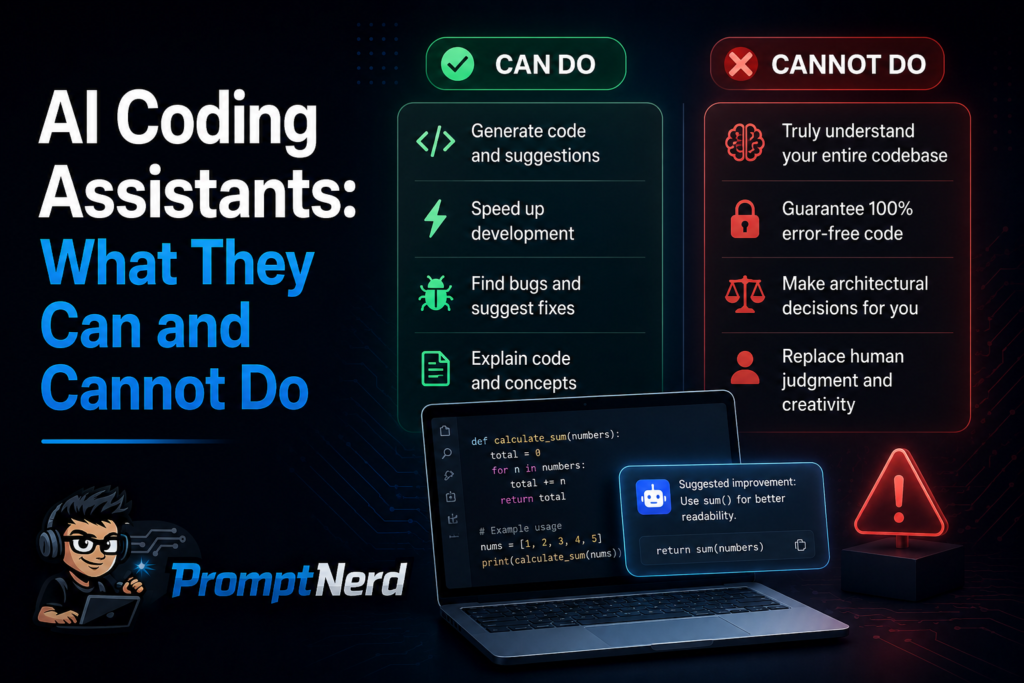
AI coding assistants are some of the most useful AI tools I have tested, but they are also some of the easiest to misunderstand. They can write code, explain errors, suggest improvements and speed up repetitive development tasks. At the same time, they can produce wrong logic, miss context, invent functions, misunderstand architecture and create code that looks correct but fails in real use.
That is why I do not think of AI coding tools as replacements for developers. I think of them as fast, helpful and sometimes overconfident assistants. They are good at giving you a starting point. They are not good at taking responsibility for the final result.
If you use them with that mindset, they can be genuinely useful.
What AI coding assistants are good at
AI coding assistants are strongest when the task is clear and the expected output is easy to verify. They are especially helpful with routine programming work, small functions, syntax reminders, code explanations and first drafts of technical solutions.
For example, if I need a simple JavaScript function, a regular expression, a SQL query draft or a basic API request example, an AI coding assistant can usually produce something useful quickly. Even if the first answer is not perfect, it often gives me a faster starting point than writing everything from scratch.
They are also helpful when I know what I want but cannot immediately remember the syntax. In that situation, the AI is not making an important architectural decision. It is helping me move faster through a familiar task.
Code generation: useful, but not final
The most obvious use case is code generation. You describe what you need, and the assistant writes a function, component, script or configuration example.
This can be useful for:
- small utility functions;
- boilerplate code;
- repetitive patterns;
- simple UI components;
- API request examples;
- test data generators;
- basic scripts;
- configuration templates.
But generated code should be treated as a draft. I do not copy and paste it blindly. I check whether the logic is correct, whether edge cases are handled, whether the dependencies exist, whether security risks are introduced and whether the code fits the project style.
AI can write code that looks convincing but is slightly wrong. That is the dangerous part. Bad generated code does not always look bad. Sometimes it looks clean and confident.
Explaining unfamiliar code
One of my favorite uses for AI coding assistants is code explanation. If I open an unfamiliar file or inherit a project, I can ask the assistant to explain what a function does, summarize a module or describe how different parts of the code connect.
This is especially helpful when working with:
- legacy code;
- large files;
- unfamiliar frameworks;
- undocumented functions;
- complex conditionals;
- inherited projects;
- third-party examples.
A good prompt here is simple:
Explain what this code does in plain English. Focus on the main flow, important variables and possible edge cases.
Or:
Summarize this file for a developer who needs to modify it. Point out the most important functions and dependencies.
The result may not be perfect, but it can help me get oriented faster. I still read the code myself, but the AI gives me a map before I walk through the details.
Debugging and error messages
AI coding assistants can be very helpful with debugging, especially when the error message is clear and you provide enough context.
A weak prompt would be:
Why is this broken?
A better prompt would be:
I am getting this error in a React component: [error message]. Here is the component code: [code]. Explain the likely cause and suggest two possible fixes.
The assistant can often identify common issues: missing imports, wrong variable names, async mistakes, type mismatches, incorrect configuration, dependency conflicts or misunderstood framework behavior.
But debugging is also where AI can become unreliable. If it does not have the full context, it may guess. It may suggest fixes that solve a different problem. It may focus on the visible error while missing the deeper cause.
So I use AI debugging suggestions as hypotheses, not answers. The assistant can say, “Try checking this.” I still need to test, inspect and verify.
Writing tests
AI coding assistants are useful for generating first drafts of tests. If I provide a function and explain the expected behavior, the assistant can suggest unit tests, edge cases and example inputs.
This is valuable because writing tests often involves repetitive structure. AI can help with:
- unit test boilerplate;
- test case ideas;
- edge case lists;
- mock data;
- expected output examples;
- basic assertions;
- test descriptions.
For example:
Write unit tests for this function. Include normal cases, empty input, invalid input and one edge case. Use Jest.
This can save time, but again, the output needs review. The assistant may test implementation details instead of behavior. It may miss important edge cases. It may generate tests that pass for the wrong reason.
I like using AI to expand my test thinking, not to replace it.
Refactoring and cleanup
Another useful area is refactoring. AI assistants can suggest cleaner structure, reduce repetition, rename variables, split large functions and explain how to simplify code.
A good refactoring prompt is:
Refactor this function for readability without changing its behavior. Explain what you changed and why.
Or:
Suggest improvements to this code, but do not rewrite everything. Focus on readability, duplication and maintainability.
The “without changing behavior” part matters. Refactoring is not the same as redesigning. If the assistant changes logic while making the code look cleaner, that can introduce new bugs.
I usually prefer asking for suggestions first, then deciding what to apply manually. Full automatic rewrites can be useful, but they need careful comparison with the original behavior.
Documentation and comments
AI coding assistants are good at turning code into explanations. They can write function comments, README sections, API descriptions and short usage notes.
This is useful when documentation is missing or when a project needs a quick explanation for future maintainers.
Example prompt:
Write a short README section explaining how this script works, what inputs it expects and how to run it.
Or:
Add concise comments to this code. Do not comment obvious lines. Focus on the parts that explain business logic.
The second instruction is important because AI sometimes over-comments. It may explain every line, including obvious syntax. Good documentation should help the next developer understand intent, not repeat the code in words.
Learning programming concepts
For beginners, AI coding assistants can be excellent tutors when used carefully. They can explain syntax, compare approaches, show examples and answer follow-up questions without judgment.
For example:
Explain async/await in JavaScript using a simple example. Then show the same logic with promises.
Or:
I understand basic HTML and CSS. Explain what a React component is in that context.
This can make learning faster because the user can ask for explanations at their current level. But beginners also face a risk: they may accept wrong or low-quality answers because they do not yet know how to evaluate them.
If you are learning with AI, I recommend asking it to explain, not just solve. The goal should be understanding.
What AI coding assistants cannot do reliably
Now the important part: limitations.
AI coding assistants cannot fully understand your product goals unless you explain them. They cannot guarantee security. They cannot know every hidden requirement. They cannot always see the entire architecture. They cannot reliably judge whether a change is safe in production. They cannot replace code review, testing or developer responsibility.
They can also hallucinate. In coding, hallucination often means the assistant invents a function, library method, configuration option or API behavior that does not exist. This is especially common when working with less common tools, new versions, private APIs or incomplete context.
The code may look correct. The explanation may sound confident. That does not mean it is true.
Security is not optional
Security is one area where I am especially careful. AI assistants can accidentally suggest unsafe patterns: weak validation, exposed secrets, insecure authentication logic, unsafe SQL handling, poor permission checks or careless dependency usage.
If the generated code touches user data, authentication, payments, file uploads, database queries or permissions, I review it very carefully. I do not rely on the assistant’s confidence.
A useful prompt is:
Review this code for security risks. Focus on input validation, authentication, authorization, data exposure and injection risks.
But even then, the AI review is only a first pass. Serious security decisions need human expertise and proper testing.
Architecture decisions need human judgment
AI can help discuss architecture, but it should not make major architecture decisions alone. It can compare options, list trade-offs and explain patterns, but the developer still needs to understand the project constraints.
For example, an assistant might recommend a complex architecture because it sounds professional, even when a simpler solution is better. Or it might suggest a library that does not fit the team’s stack, deployment process or maintenance capacity.
For architecture, I prefer prompts like:
Compare three possible approaches for this feature. Keep the project small and maintainable. Explain trade-offs, not just benefits.
This produces a better discussion. But the final decision should be based on real project context.
Privacy and code exposure
Another issue is privacy. Developers should be careful about pasting private code, secrets, client data, credentials, proprietary algorithms or internal business logic into AI tools without understanding the tool’s data policies.
Even when a tool is useful, not every codebase should be copied into it. Teams need clear rules about what can be shared, what must stay private and which tools are approved for work projects.
Before using an AI coding assistant in a professional environment, I would check:
- whether the company allows it;
- what data the tool stores;
- whether private repositories are protected;
- whether prompts may be used for training;
- whether secrets or credentials could be exposed;
- whether enterprise privacy controls are available.
This is not the most exciting part of AI coding, but it matters.
How I use AI coding assistants safely
My personal approach is simple: I use AI coding tools for acceleration, not authority.
I ask for drafts, explanations, test ideas and refactoring suggestions. Then I review everything. I run the code. I check the docs. I compare the answer with the project context. I do not assume the assistant is right just because it sounds confident.
A useful workflow looks like this:
- Define the task clearly.
- Ask for a small piece of code or explanation.
- Review the output manually.
- Test it in the real environment.
- Ask follow-up questions if needed.
- Refactor or rewrite before using it seriously.
The smaller the task, the more useful the assistant usually is. The bigger and more ambiguous the task, the more human control is needed.
Good prompts for AI coding assistants
Here are a few prompts I use or adapt:
Explain this code in plain English. Focus on what it does, not on every line.
Refactor this function for readability without changing behavior.
Suggest possible causes of this error and explain how to test each one.
Write unit tests for this function using [testing framework]. Include edge cases.
Review this code for security issues and maintainability problems.
Generate a simple example of how to use this API.
Compare two implementation approaches and explain the trade-offs.
Add comments only where the business logic is not obvious.
These prompts work because they define the task. They do not just ask the AI to “make it better.”
When not to use an AI coding assistant
There are times when I would avoid relying heavily on AI:
- when handling sensitive private code;
- when working with security-critical logic;
- when making major architecture decisions;
- when the project context is too complex to explain;
- when I cannot test the output properly;
- when I do not understand the generated code;
- when the assistant suggests changes I cannot verify.
That last point is important. If I cannot understand the AI’s solution, I do not treat it as a shortcut. I treat it as a warning sign.
Conclusion
AI coding assistants are useful tools, but they are not senior developers living inside your editor. They can speed up small tasks, explain unfamiliar code, suggest tests, draft documentation and help debug common issues. They can also make mistakes, invent APIs, miss context and produce code that looks better than it really is.
The best way to use them is with a practical mindset. Give clear instructions. Keep tasks focused. Review the output. Test everything. Be careful with security and private code. Use AI to move faster, not to stop thinking.
That is where AI coding assistants are strongest: not as replacements for developers, but as helpful partners for developers who still own the final result.